


02. 04. 2026
NetEye, Unified Monitoring

03. 05. 2017
Patrick Zambelli
NetEye, NetEye
NetEye 3.10 und EriZone 5.1 stehen ab sofort zur Verfügung!
Wir freuen uns die Veröffentlichung neuer Minor Releases unserer IT System & Service Management Lösungen NetEye und EriZone ankündigen zu dürfen.
- Zu den Release Notes von NetEye 3.10 (IT System Management Lösung)
- Zu den Release Notes von EriZone 5.1 (IT Service Management Lösung)
NetEye 3.10
Neben der Entwicklung neuer Funktionen in den Bereichen Netzwerk Analyse, Business Service Management und SAP Monitoring, haben wir uns in Hinblick auf die neueste NetEye-Version besonders auf die Verbesserung der Stabilität und die Erweiterung bestehender Module konzentriert.
In Vergangenheit haben wir die Release-Informationen der aktuellen Softwareversionen als PDF hier auf unserem Blog bereitgestellt, ab der aktuellen Version pflegen wir das Archiv der Release Notes auf unserer Unternehmenswebseite. (Ab dem nächsten Release werden wir auch für EriZone ein solches Archiv erstellen. Nichtsdestotrotz werden alle neuen Versionen weiterhin auf unserem Blog angekündigt werden.)
>> Zu den Release Notes auf unserer Unternehmenswebseite.
EriZone 5.1
Major Enhancements
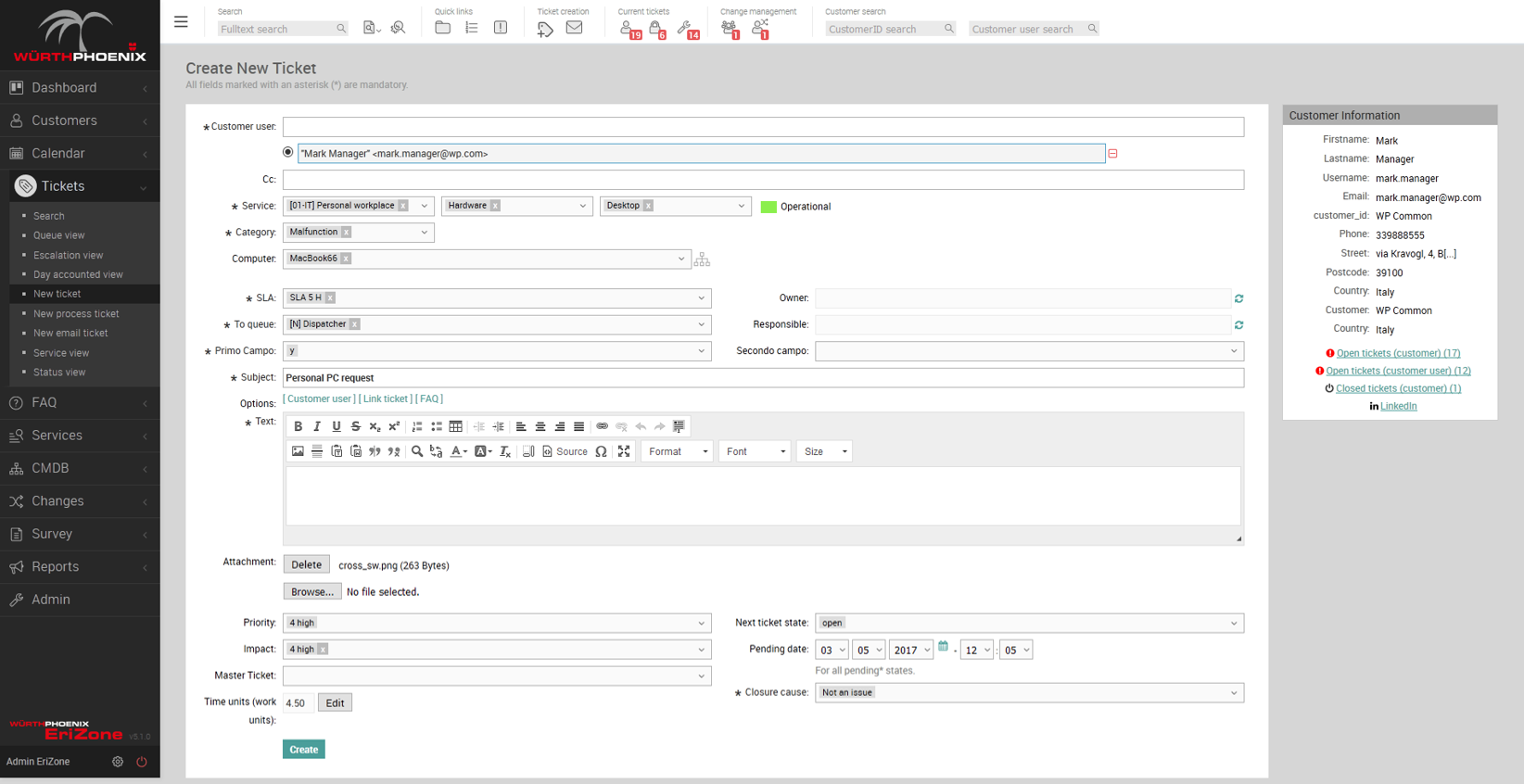
- Überarbeitetes “Neues Ticket erstellen” Formular im Agent-Frontend: Für das schnellere Erstellen eines neuen Tickets wurde das entsprechende Formular verbessert.
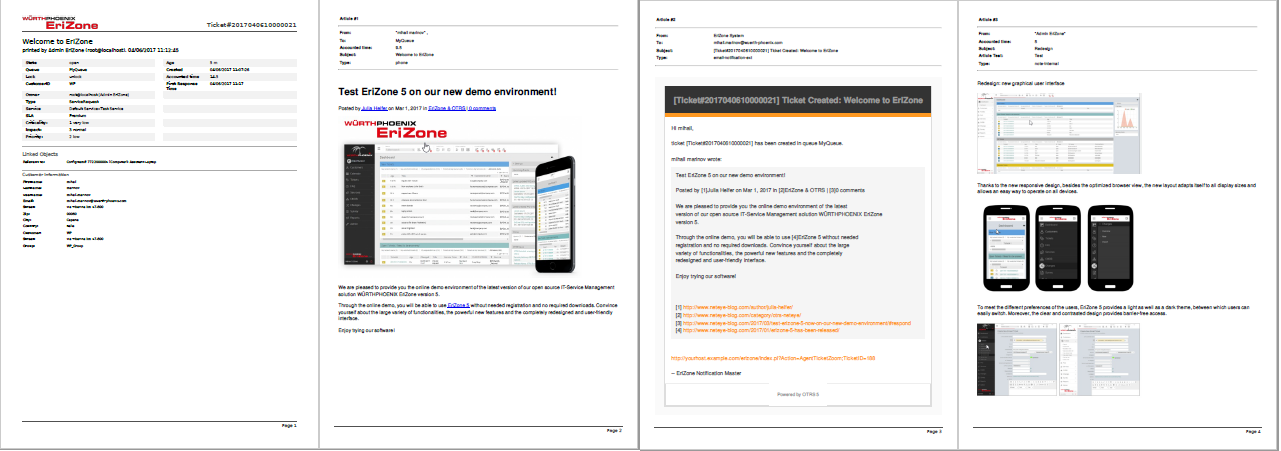
- HTML Druck: Das Ausdrucken von Tickets (als PDF) wurde verbessert. Es ist nun möglich alle enthaltenen Bilder und HTMLs eines Tickets zu drucken.
- Übersetzbarkeit: es ist nun möglich den Servicekatalog basierend auf den Lokalisierungseinstellungen des Users zu übersetzen.
- Integration des OTRS Kalender Add-Ons: das neueste OTRS 5s Kalender Add-On wurde integriert
- Servicekatalog nach customerID: es ist nun möglich ganze Servicekataloge an CustomerIDs zuzuweisen (vorher war es nur möglich einzelne Services an CustomerIDs zuzuweisen).
Minor Enhancements
- Übersetzung: Verfügbarkeit der kompletten englischen, italienischen und deutschen Übersetzung
- Neues Layout der Email-Benachrichtigungen
Under the Hood
- Upgrade auf OTRS 5.0.18
- Major Bug Fixes der EriZone Themes
- Neues Modul AgentTicketPhoneSplit: es ist nun möglich das Split-Formular weiter zu personalisieren (ACL und JQuery)
- Neuer ActivityDialogLink: es ist nun möglich ein bestehendes EriZone Module (z.B. AgentTicketPriority) über Prozess-Management-Buttons aufzurufen
Vorbereitungen vor dem Upgrade von EriZone 5.0 auf EriZone 5.1.*
- Snapshot der virtuellen Maschine erstellen
- Aktivieren der “repo resolution” mit den folgenden Parametern in Admin >>SysConfig:
- Package::RepositoryRoot:
- http://repo.wuerth-phoenix.com/erizone/erizone-5.1/repository.xml
- Package::RepositoryList:
- KEY: http://repo.wuerth-phoenix.com/erizone/erizone-5.1/packages/
- VALUE: erizone-5.1 packages
- Package::RepositoryRoot:
- Erstellen einer neuen Konfigurationsdatei: /etc/httpd/conf.d/zzz_erizone.conf mit folgendem Inhalt:
ScriptAlias /erizone/ “/opt/otrs/bin/cgi-bin/”
Alias /erizone-web/ “/opt/otrs/var/httpd/htdocs/”
#force redirect
RedirectMatch ^/$ /erizone/customer.pl
RedirectMatch /otrs/customer.pl /erizone/customer.pl
RedirectMatch /otrs/index.pl /erizone/index.pl
Upgrade Vorgang
- Upgrade des OTRS Frameworks auf Version 5.0.18 durch um service:
- yum update https://ftp.otrs.org/pub/otrs/RPMS/rhel/6/otrs-5.0.18-01.noarch.rpm
- Upgrade der Pakete via Admin >> Package Manager; Der Upgrade-Vorgang muss unbedingt in genau dieser Reihenfolge durchgeführt werden:
- ITSM
- OTRSTicketMaskExtension
- EriZone
- EriZoneCore
- EriZoneServiceDeskEnhancement
- EriZoneTheme
- EriZoneAccessManagement
- Optional: Zum Aktivieren der HTML-Druckfunktion sind die folgenden .rpm notwendig. Bitte installieren Sie diese durch den yum Service:
- yum install -y xorg-x11-fonts-Type1 –enablerepo=erizone
- yum install -y yum install -y xorg-x11-fonts-Type1 –enablerepo=erizone
- yum install -y wkhtmltox-0.12.2.1_linux-centos6-amd64 –enablerepo=erizone
- Aktivieren Sie das Feature mit den folgenden Parametern in Admin >> SysConfig
- ServiceDeskEnhancement
- Core::PDF : HTMLToPDFCommand
- Set EriZone ServiceDeskEnhancement
- Core::PDF :IncludeHTMLImageReference
Bitte beachten Sie während des Upgrades folgende Regeln:
- Sollten Sie sich unsicher sein, hilft Ihnen unser Support-Team gerne weiter: net.support@wuerth-phoenix.com oder erizone.wuerth-phoenix.com
- Die Pakete müssen einzeln und in der oben genannten Reihenfolge installiert werden
- Das System kann für einzelne Aktionen unterschiedliche Zeitintervalle benötigen. Bitte haben Sie etwas Geduld.
- Alle Action Buttons dürfen jeweils nur einmal gedrückt werden, um die entsprechende Aktion ordnungsgemäß auszuführen
[box type=”info”] ACHTUNG
Bitte nach dem Upgrade folgendes über die Command Line ausführen:
/opt/otrs/scripts/EriZone/erizone.global_makelink
/opt/otrs/scripts/EriZone/Permissions.sh
/opt/otrs/scripts/EriZone/RestartEriZone.sh
[/box][/box]

Patrick Zambelli
Project Manager at Würth IT Italy
After my graduation in Applied Computer Science at the Free University of Bolzano I decided to start my professional career outside the province. With a bit of good timing and good luck I went into the booming IT-Dept. of Geox in the shoe district of Montebelluna, where I realized how a big IT infrastructure has to grow and adapt to quickly changing requirements. During this experience I had also the nice possibility to travel the world, while setting up the various production and retail areas of this company. Arrived at Würth Phoenix (now Würth IT Italy) I started developing on our monitoring solution NetEye. Today, in my position as Consulting an Project Manager I am continuously heading to implement our solutions to meet the expectation of your enterprise customers.
Author

Latest posts by Patrick Zambelli
16. 01. 2024
NetEye, Unified Monitoring
Icinga 2 DSL for Defining the Monitoring Status of Objects with Director
23. 12. 2020
NetEye
Tornado – Getting in Action with Sample Rules
05. 05. 2020
NetEye, Unified Monitoring
Import Data Correlation and Automation with Icinga2 Director