


25. 03. 2026
Atlassian, NetEye, Uncategorized, Unified Monitoring

13. 11. 2018
Benjamin Gröber
NetEye, Unified Monitoring
How We Leveraged DRBD 9 Autopromote for a Simplified Pacemaker Cluster Layout
Historically, NetEye Clusters were configured with DRBD as Master/Slave resources. This led to the following rather cumbersome resource configuration for an N-node cluster:
- $SERVICE_drbd_master ( x 1 )
- $SERVICE_drbd_master_clone ( x N )
- $SERVICE_drbd_fs
- $SERVICE_virt_ip
- $SERVICE
Note: $SERVICE serves as a placeholder for any Cluster Service running in NetEye 4.
At least ten constraints were necessary to model the required relations (on promote once, collocation 5 times, and after 4 times):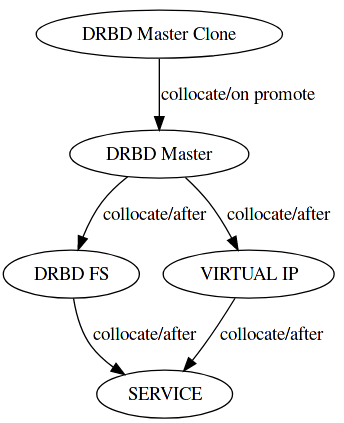
DRBD 9 introduced a nice little convenience feature called “autopromote”. This automatically promotes a node to primary as soon as the DRBD resources’ block device is mounted. If dual primary mode is configured, then this works on up to 2 nodes, otherwise the mount just fails.
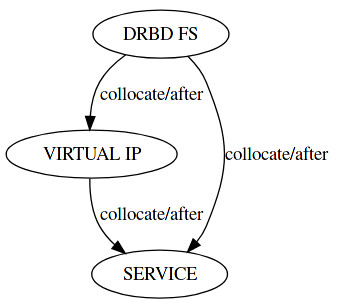
We can rely on this behavior to dispose of the ugly Master/Slave part of the above Cluster configuration. The resources can then be reduced to the following:
- $SERVICE_drbd_fs
- $SERVICE_virt_ip
- $SERVICE
The constraints also become a lot simpler:
Why didn’t we just use Resource Groups?
Well, you can’t put Master/Slave resources in a Resource Group. However, as you may have noticed, we just got rid of all master/slave resources. This means we actually can get rid of all constraints! Resource groups already enforce the necessary collocation and order constraints on their members.
The final result is the following 4 Resources ( 1 Group + 3 Members ) per Service/DRBD Device:
- $SERVICE_group
- $SERVICE_drbd_fs
- $SERVICE_virt_ip
- $SERVICE
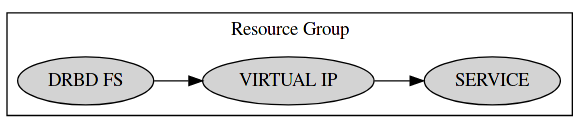
No constraints whatsoever are necessary, and furthermore DRBD is no longer a cluster-controlled service, but can be run and monitored as a local service on each individual node.

Benjamin Gröber
R&D Software Architect at Wuerth Phoenix
Hi, my name is Benjamin, and I'm Software Architect in the Research & Development Team of the "IT System & Service Management Solutions" Business Unit of Würth Phoenix.
I discovered my passion for Computers and Technology when I was 7 and got my first PC. Just using computers and playing games was never enough for me, so just a few months later, started learning Visual Basic and entered the world of Software Development. Since then, my passion is keeping up with the short-lived, fast-paced, ever-evolving IT world and exploring new technologies, eventually trying to put them to good use. I'm a strong advocate for writing maintainable software, and lately I'm investing most of my free time in the exploration of the emerging Rust programming language.
Author

Latest posts by Benjamin Gröber
25. 11. 2022
Development
What is the perfect development team size?