


30. 12. 2025
Atlassian, Service Management

As I promised you some time ago I want to tell you about a free App in the Atlassian Marketplace which for me is a must-have.
The app is called Clockwork Automated Timesheet Free and it can be found on the Atlassian Marketplace.
The numbers speak for themselves:
- More than 4,700 downloads at the end of 2021
- An average rating of 4/4
- Participation in the Cloud Security Participant program
Well, the prerequisites are all there, let’s see specifically what this app can do and why it can be very important for your work.
Even with the free version of this app you can do a lot of things, including:
- Automatically log the time taken on an issue, for example by setting the start of the time count to the “in progress” state and the end to the “done” state
- Log the time manually by starting a counter and then stopping it when processing is suspended
- Or enter the amount of time worked, once the work is completed
The app is very recent (September 2021) and adds a fundamental feature that is currently not present in Jira Service Management: the timesheet report.
Jira Service Management lets you enter the processing times of the various issues at any time (as does Jira Software).
This is very important not only for managers who need to understand which issues consume a lot of time, but also for those who insert time amounts into the various issues in Jira. However with Jira Service Management it’s not possible to have a timesheet report about issues divided by day.
Imagine the following scenario:
You work with Jira around the clock on dozens of different issues. Every time you work on an issue, you log the time dedicated to that particular issue (although something can always get left out).
At the end of the month you’ll want to be sure that you have entered about 8 hours a day. Fine, but how do you check if you’ve forgotten to enter a few hours somewhere?
With Clockwork Automated Timesheet Free you can easily check this!
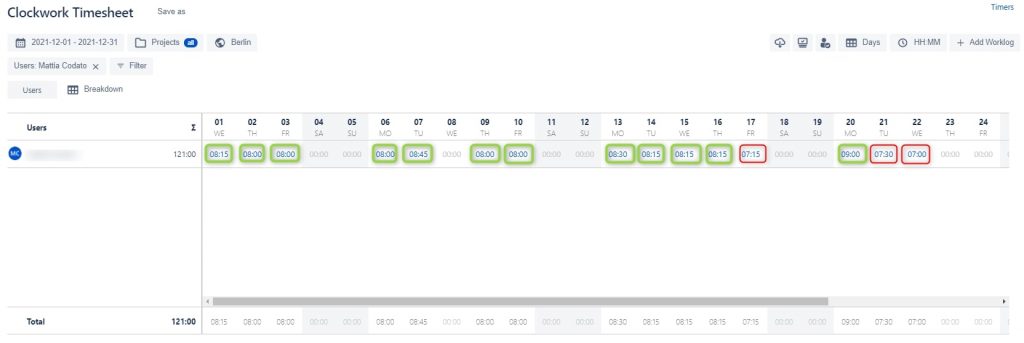
Or imagine another scenario:
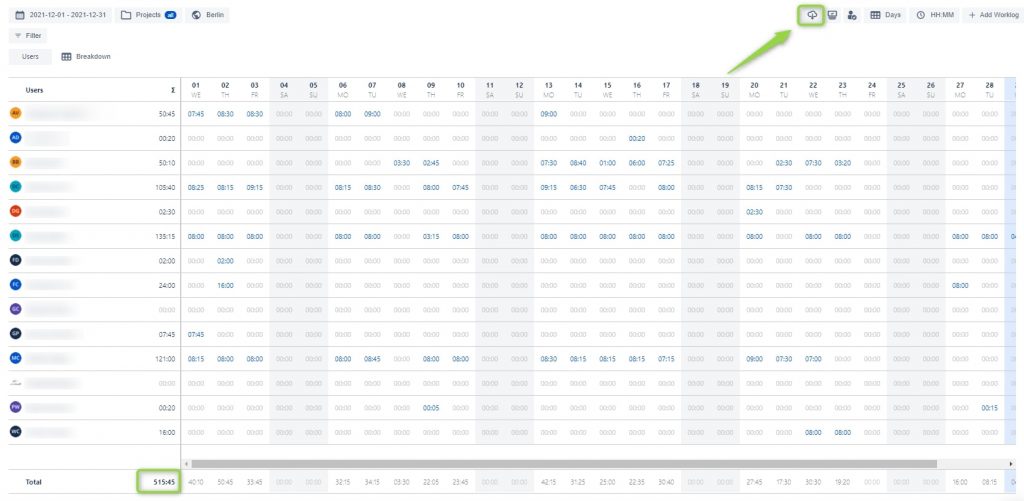
You work with a group of more than 10 people and you are responsible for the count that will be billed to the customer. How do you produce a report of all the hours worked?
With Clockwork Automated Timesheet Free you can view the total and easily export the result to Excel!
What if you want to see the time it takes to carry out your epics? No problem, you can use the breakdown and either add epics or replace them for users in the view in order to get the same previous total but with a different view.
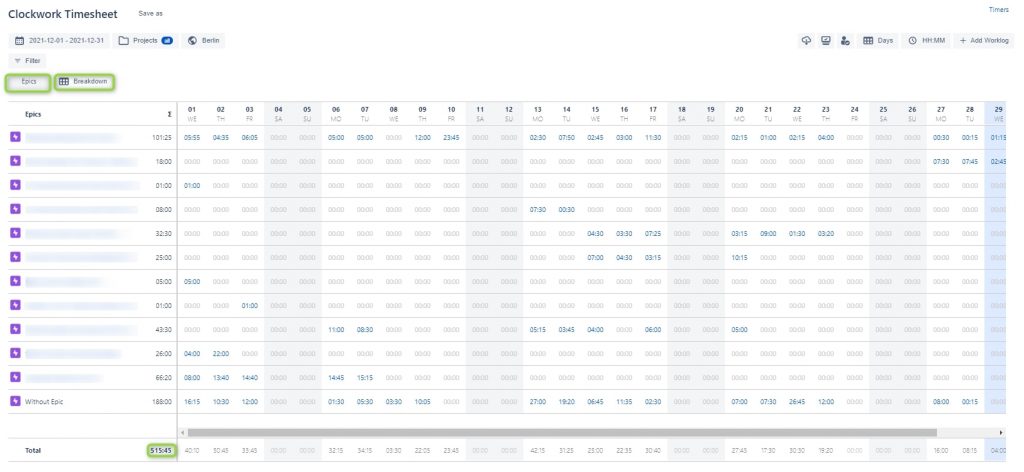
In fact, even if you don’t use Clockwork Automated Timesheet Free’s automatic time entry but want to use Jira’s manual entry, Clockwork Automated Timesheet Free gets the information entered in the official Jira Worklog and displays the times just as you need them.
The product is really useful and implemented well, try installing it on your Jira environment and using filters and breakdowns on the data you already have. I am sure you’ll be fully satisfied with it!

Gabriele Cecco
Technical Consultant at Würth IT Italy
I’m Gabriele Cecco, a consultant at Wuerth Phoenix with extensive experience in ITSM processes. Over the years, I’ve worked with various ITSM software tools, and since 2020, I’ve specialized in the Atlassian suite, earning certifications and helping many companies configure their Atlassian products.
In my free time, I enjoy listening to science and entertainment podcasts, watching movies and TV series, and traveling. I’m passionate about exploring the world, and when I’m not traveling abroad, I love spending weekends in South Tyrol with my wife and our minivan, Windy.
Author

Latest posts by Gabriele Cecco
30. 12. 2025
Atlassian, Service Management
Jira Service Management: The Great Architect’s Dilemma, Single Project vs Multiple Projects
16. 03. 2025
AI, Atlassian, Service Management
Understanding Customer Sentiment in Jira Service Management to Enhance Support
31. 12. 2024
Atlassian, Service Management
How to Use the New ‘Request Type Groups’ Feature in Jira Service Management