
As described on one of my previous post about UPS Monitoring we developed a NetEye check plugin to monitor the UPS devices and report data on them. In the past months we have been working on this features by adding a lot of more devices to the plugin. These devices are UPSs and energy stations. Here is the complete list:
- Netvision Energy Stations
- Delta
- Benning
- Netman
- Plurys
With the plugin you’ll be able to monitor your UPS devices and to visualize on graphs their performance values as the load, current, input and output.
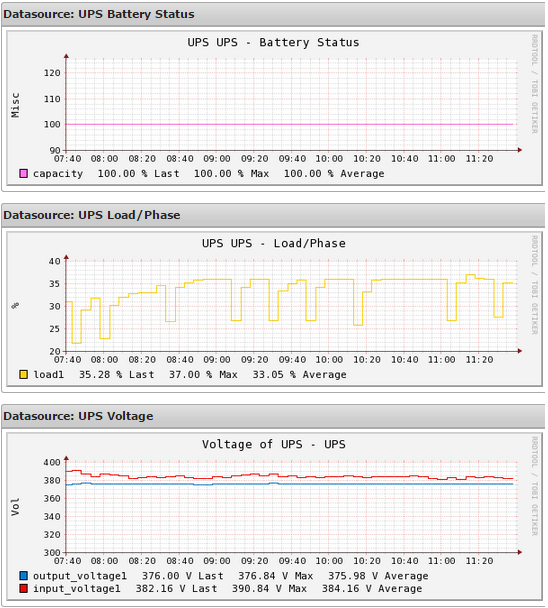
If you would like to try the plugin you can download the new version here: Generic UPS monitoring plugin
In the following lines you can find a short description about the plugin usage:
check_snmp_ups.pl --help
SNMP UPS Monitor for Nagios version 3.2.0
GPL Licence, (c)2015 Juergen Vigna
Usage: neteye-plugins/plugins/check_snmp_ups.pl [-v] -H -C <snmp_community> [-2] | (-l login -x passwd [-X pass -L , ]) [-p ] -T (general|netvision|socomec|socomecnew|generex|chloride|
apcats|apcups|mge|nvenergy|delta|benning) [-B <warn,crit>] [-O <warn,crit>] [-A ] [-f] [-t ] [-o ] [-i ] [-V]
-v, –verbose
print extra debugging information
-h, –help
print this help message
-H, –hostname=HOST
name or IP address of host to check
-C, –community=COMMUNITY NAME
community name for the host’s SNMP agent (implies v1 protocol)
-2, –v2c
Use snmp v2c
-l, –login=LOGIN ; -x, –passwd=PASSWD
Login and auth password for snmpv3 authentication
If no priv password exists, implies AuthNoPriv
-X, –privpass=PASSWD
Priv password for snmpv3 (AuthPriv protocol)
-L, –protocols=, : Authentication protocol (md5|sha : default md5)
: Priv protocole (des|aes : default des)
-P, –port=PORT
SNMP port (Default 161)
-T, –type=general|netvision|socomec|socomecnew|apcats|
apcups|mge|nvenergy|delta|benning
Environemental check :
general : general UPS status
netvision : voltage,battery,load and alerts
socomec : voltage,battery,load and alerts
socomecnew: voltage,battery,load and alerts
generex : battery,status,output and alerts
chloride : battery,status,output and alerts (same as generex)
apcups : battery,input voltage,output load
apcats : input source, load
mge : battery,status,input voltage,output voltage and alerts
nvenergy : netvision energy stations battery,input voltage,output
delta : status,output load (from generex)
benning : status of Benning Energy stations
netman : generex reduced no load and capacity data
plurys : netvision without capacity
-B, –battery=<%battery left>
Warning,Critical minimum battery level in percent (default: 80,50)
-O, –load=
Warning,Critical Maximum Load of UPS before giving a warning (default: 75,90)
-A, –voltage=
Warning Minimum Voltage of UPS before giving a warning (default: 200)
-o, –output_lines= Number of output lines to check (default: 1)
-i, –input_lines= Number of input lines to check (default: 1)
-f, –perfparse
Perfparse compatible output
-t, –timeout=INTEGER
timeout for SNMP in seconds (Default: 5)
-V, –version
prints version number



Juergen Vigna
NetEye Solution Architect at Würth IT Italy
I have over 20 years of experience in the IT branch. After first experiences in the field of software development for public transport companies, I finally decided to join the young and growing team of Würth Phoenix (now Würth IT Italy). Initially, I was responsible for the internal Linux/Unix infrastructure and the management of CVS software. Afterwards, my main challenge was to establish the meanwhile well-known IT System Management Solution WÜRTHPHOENIX NetEye. As a Product Manager I started building NetEye from scratch, analyzing existing open source models, extending and finally joining them into one single powerful solution. After that, my job turned into a passion: Constant developments, customer installations and support became a matter of personal. Today I use my knowledge as a NetEye Senior Consultant as well as NetEye Solution Architect at Würth Phoenix.
Author

Latest posts by Juergen Vigna
22. 05. 2025
NetEye, Unified Monitoring
Automatic Integration of NagVis Map into Icinga Web 2/NetEye Monitoring